Breakdown of what goes on under the hood of sync engines
I got introduced to sync engines while building Cobalt on Next.js. Page navigation felt slow, and Cobalt is a data-heavy app. Each route renders at least five different components, each making its own API request, and the responses contain huge objects and arrays.
The TLDR of the Next.js App Router: routing is file-system based, and rendering defaults to the server via React Server Components. The client-side router handles in-app navigation, but each route's content is rendered on the server, and the recommended pattern is to fetch data inside Server Components. Marking a component "use client" makes it a Client Component, which still gets server-rendered to HTML on the first request and then hydrated on the client; it doesn't opt out of SSR, just out of being a Server Component. The code looks something like this:
async function getTransactions(userId: string) {
  const res = await fetch(`https://api.cobalt.dev/users/${userId}/transactions`, {
    headers: { Authorization: `Bearer ${process.env.API_TOKEN}` },
  });
  return res.json();
}

export default async function TransactionsPage() {
  const transactions = await getTransactions("user_123");
  return <TransactionList items={transactions} />;
}
Because Next.js renders on the server by default, the server handles both data fetching and producing HTML. It fetches the data and returns the page's HTML with that data already baked in. This is server-side rendering (SSR). Hydration is the separate, follow-up step on the client, where React attaches event handlers and state to the server-rendered HTML to make it interactive. Traditional client-side frameworks like React SPAs leave both rendering and data fetching to the client.
The server does a lot more work in Next.js than in client-side rendered apps, which adds latency to every navigation. Next.js gives you two ways to handle this.
First, you can show nothing on click and wait until the server returns the hydrated page before navigating.
Second, you can define a loading state, either with a loading.js file or by wrapping the component in React Suspense. They're the same thing under the hood; loading.js uses Suspense internally.
export default function Loading() {
  return <TransactionListSkeleton />;
}import { Suspense } from "react";
export default function TransactionsPage() {
return (
<Suspense fallback={<TransactionListSkeleton />}>
<TransactionList />
</Suspense>
);
}With this setup, navigation first renders the loading state you defined, then swaps in the full page once the server responds.
Next.js also lets you stream data in chunks. Say you have two UI components that call different APIs. Without streaming, the user waits for both calls to finish before anything renders. With streaming, the server renders each component's UI as soon as its call resolves, so one component never blocks the other.
Next.js is great for mostly-static sites but struggles with dynamic, edit-heavy apps like Linear, Notion, or GitHub.
You can work around a lot of this by prefetching. In production, Next.js prefetches routes as their <Link>s enter the viewport, so the route and its data are ready before the user clicks. The tradeoff: you rack up server costs for routes the user never actually visits.
import Link from "next/link";

export function TransactionsLink() {
  // Prefetches on viewport intersection by default in Next.js.
  return <Link href="/transactions" prefetch>View transactions</Link>;
}
Our users spend a lot of time viewing finances, tagging transactions, and making edits, so delivering the fastest possible experience mattered a lot.
The only real cost of moving off Next.js is losing SEO benefits, which you probably don't need inside the app. Maybe for your landing page, but not for the authed product.
So our first optimization was switching from Next.js to a client-only setup with TanStack Router. (TanStack also has TanStack Start, which supports SSR and RSC, but we chose the plain client-only Router.) It gives us a lot of the same data-fetching patterns as Next.js, like attaching loaders to route handlers, but everything runs in the browser.
import { createFileRoute } from "@tanstack/react-router";

export const Route = createFileRoute("/transactions")({
  loader: async () => {
    const res = await fetch("/api/transactions");
    return res.json();
  },
  component: TransactionsPage,
  pendingComponent: TransactionListSkeleton,
});

function TransactionsPage() {
  const transactions = Route.useLoaderData();
  return <TransactionList items={transactions} />;
}
This made routing faster. Now we only wait on the server for data; the client handles rendering. By default, TanStack Router does suspend navigation while the loader runs and shows the route's pendingComponent, so you still get a loading state. On stale revalidation, the existing data shows immediately and new data fills in (SWR-style), but you can opt into blocking with staleReloadMode: 'blocking' if you need it. TanStack Router also provides preload-on-hover and preload-on-viewport APIs, comparable to Next.js prefetching.
We also wanted realtime updates. Like any productivity tool, if one user makes a change, the other should see it instantly. In traditional server frameworks, this gets expensive fast: caching, invalidation, all of it.
Cobalt is used by couples. They sit down every Sunday and tag transactions together from their own laptops. If one partner makes a change, the other should see it automatically. We needed a sync path from server to client without hand-rolling state management and cache invalidation.
Studying what made Linear so fast, we found the concept of a sync engine.
A sync engine is a process that keeps local changes in your app in sync with your server.
Every modern browser ships with a database called IndexedDB. Open DevTools > Application and you'll see a list of local stores. IndexedDB is one of them. Think of it as a more powerful version of localStorage.
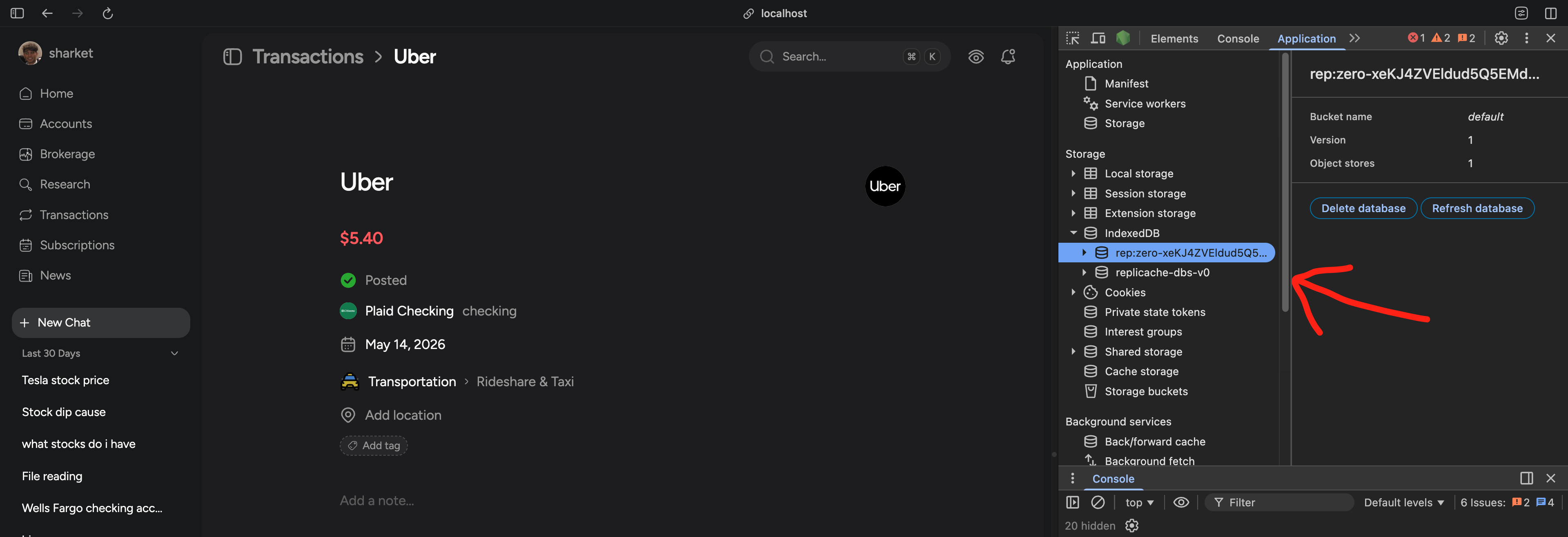 DevTools → Application → IndexedDB. Cobalt's local store lives here.
A sync engine's job is to keep your server database in sync with the client's IndexedDB. The solution we use hosts a SQLite cache and holds a persistent WebSocket between the server DB and the client.
So when a user navigates to a route, data is read from their local IndexedDB instead of making a full round-trip HTTP request to the server.
Mutations work the same way in reverse. The action writes directly to IndexedDB, and the sync engine reconciles the local mutation back to the server in the background.
import { useZero } from "@rocicorp/zero/react";

export function TagButton({ txId, tag }: { txId: string; tag: string }) {
  const z = useZero();

  async function onClick() {
    // Writes locally to IndexedDB immediately.
    // Zero replays the mutation against the server in the background.
    await z.mutate.transactions.update({ id: txId, tag });
  }

  return <button onClick={onClick}>Tag</button>;
}
The design sounds simple, and when I first heard about it I wondered why everyone doesn't just do this. A few reasons:
- IndexedDB is browser-only. Native mobile apps can't use it.
- The IndexedDB API is awful to work with directly.
- Not many SaaS products offer this out of the box.
- You have to handle server reconciliation. What happens when multiple clients mutate the same row at the same time?
We evaluated a few options and went with Zero. Our hard constraint was bring-your-own auth and database. We didn't want either bundled into the service, since we still needed traditional REST APIs for our public API, MCP, and mobile app, backed by our own PlanetScale database and self-hosted auth. Zero was the only option that fit.
So how does the sync actually work? Postgres has a feature called Write-Ahead Logging (WAL): every change is written to an on-disk log before being applied to table data. That's what gives Postgres durability and crash recovery. Zero piggybacks on the WAL through Postgres logical replication: it acts as a replication client and streams every committed change out of your DB in real time. You enable this by setting wal_level = logical on your Postgres instance and creating a replication slot for Zero. Zero then maintains its own SQLite-based cache of the data and fans changes out to connected clients over a persistent WebSocket.